

Integration
Endpoints
We can provide access for test and production environment. Endpoints for access:
Test Environment
- Evrotrust Web: https://websdk.sandbox.evrotrust.com/
- Authorisation Server: http://openid.sandbox.evrotrust.com/
PROD Environment
- Evrotrust Web: https://webid.evrotrust.com/
- Authorisation Server: https://oauth2.evrotrust.com/
Get Access
| You provide | Evrotrust provides |
|---|---|
|
|
|
|
| |
|
Technical Flow
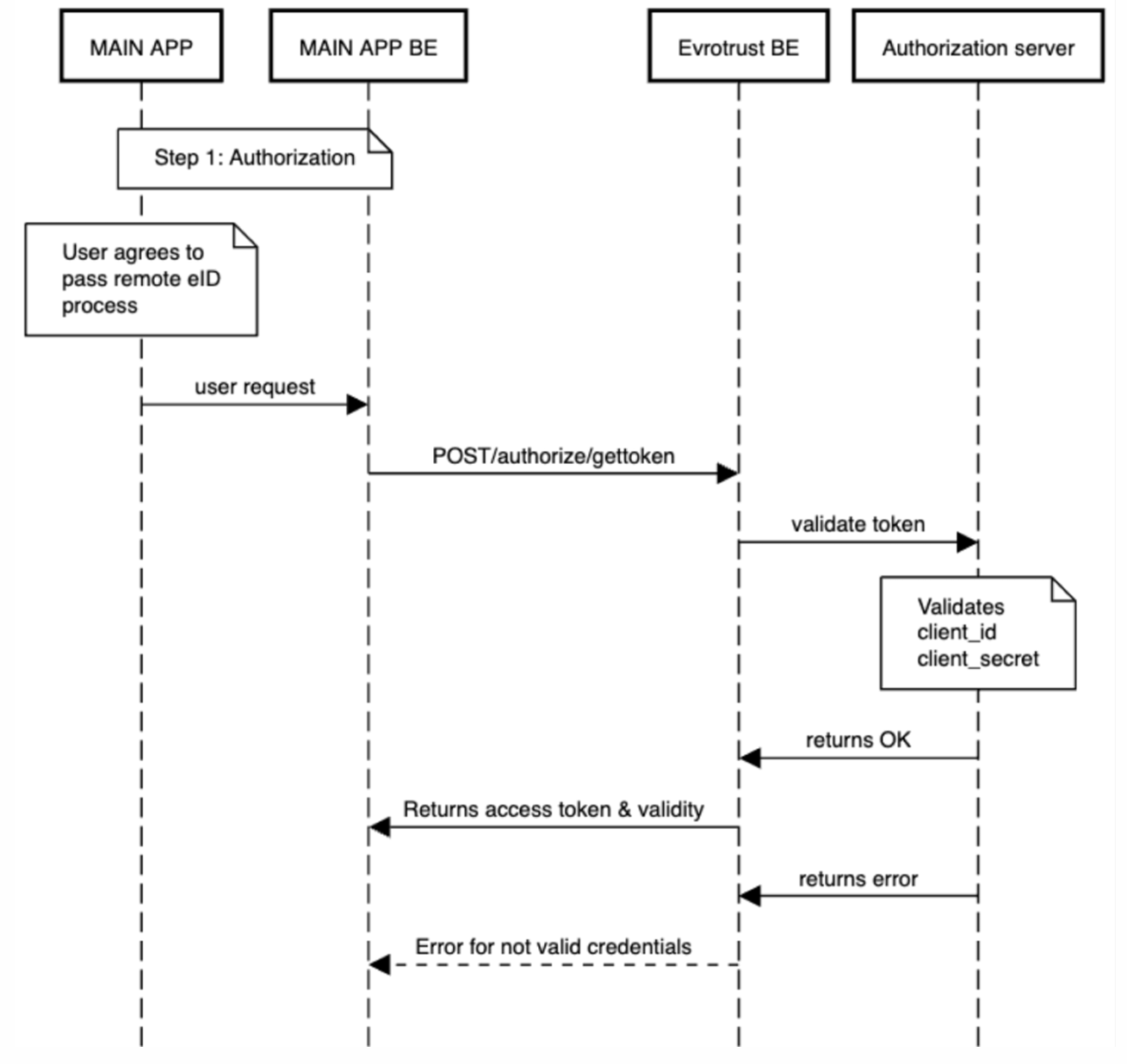
Step 1 - Authorization (/authorize/gettoken)
Parameters included:
| Parameter | Comment |
|---|---|
| "grant_type" | Should always be “client_credentials” |
| "scope" | Should always be “websdk” |
| "client_id" | The one provided by Evrotrust |
| "client_secret" | The one provided by Evrotrust |
...
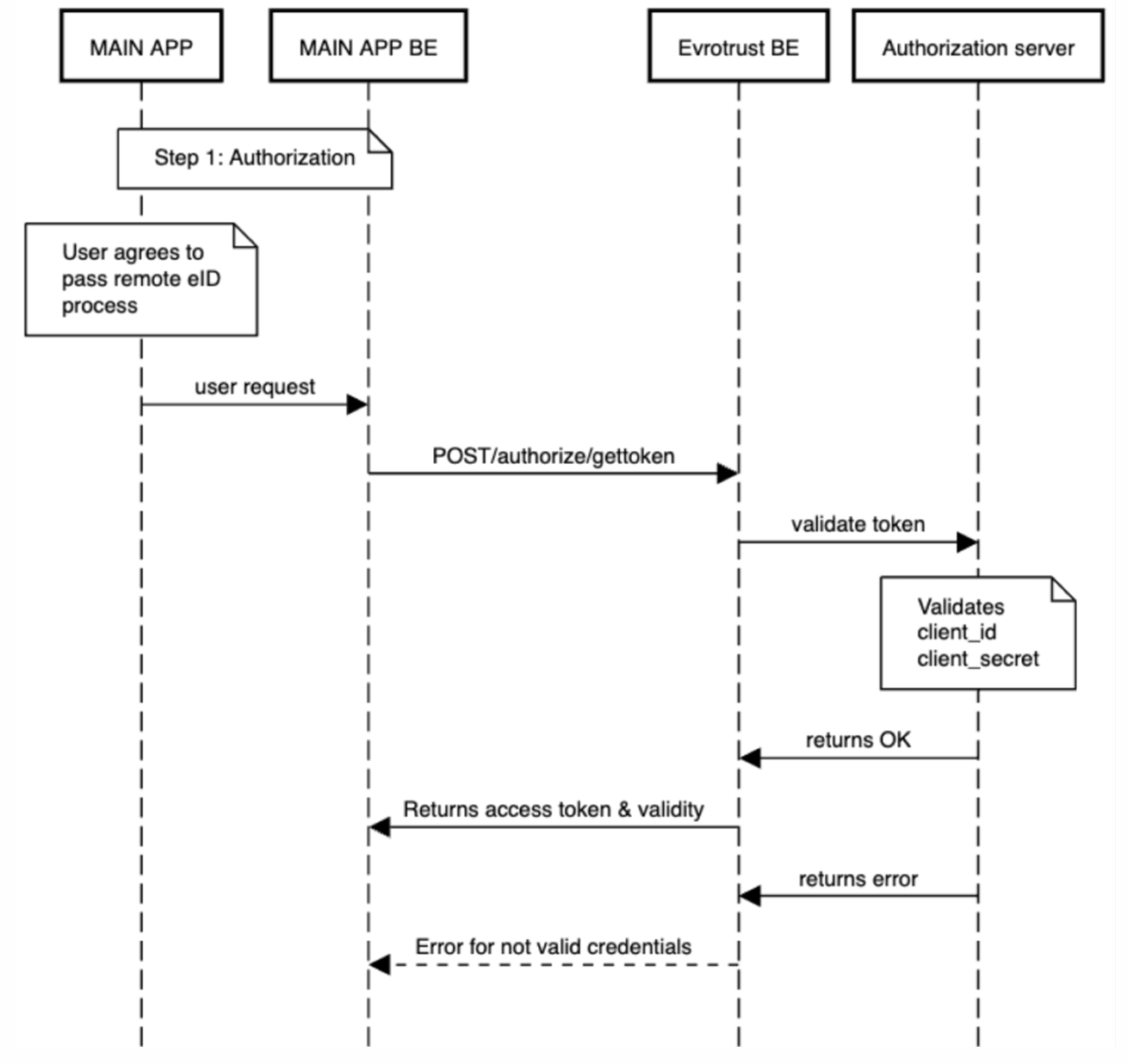
Send the request to the below endpoints depending on the environment:
More details for the request are in the technical documentation.
- Result: we will return back access token used to start Evrotrust Web
- Access token is valid for 15 calendar days, exact expiration is returned in the result in “expires_in”
- You can use 1 access token for as many requests to Evrotrust web as needed during its validity
time. You can also decide whether to request a new one or not at a shorter period of time
depending on your internal security policies - If you need to revoke an access token – use authorize/revoketoken
STEP 2 – START EVROTRUST WEB
POST request to one of the below URLs depending on the environment:
Parameters included:
| Parameter | Comment |
|---|---|
| vendor-number | The one provided by Evrotrust |
| token | The access token returned by /authorize/gettoken |
| enc-data | "lang":"","user_pid":"","user_country":"","redirect_url":"","external_reference":"","timestamp":"" |
| color-data | base64 encoded string containing json: "backgroundColor":"#FFFFFF","borderColor":"#000000","titleColor":"#000000","subTi All the parameters are optional, if sent have to be in HEX format. |
enc-data parameters:
| Parameter | Type | Comment |
|---|---|---|
| "lang" | Optional | Default value is "en". Always small letters! Valid values are "en", "bg", "de", "hu", "sq", "ro", "fr", "it", "mk". |
| "user_pid" | Optional | This is the personal identification number of the user if such is present at your system. If sent here we will make the check after document scan for match. |
| "user_country" | Optional | Valid values are the ISO 3166-1 alpha-2 codes. Default value is "BG". If this parameter is sent, the issuing country of the scanned document will be compared to it. |
| "redirect_url" | Required | URL where the user will be redirected when the process is finished. This is the one provided at p.3 above |
| "external_reference" | Required | String parameter, provided by you. Max length 32. Should be a unique identifier per user. |
| "timestamp" | Required | The current time in UTC with format YYYY-MM-DD hh:mm:ss We |
The enc-data JSON has to be encrypted using algorithm RSA 4096 and then converted to hex encoded string. The public key is provided by Evrotrust.
All possible results and errors are described in the technical documentation.
NB! After successful identification Evrotrust will generate unique RefID and return it back in the result.
It is used to get user data:
- User data should be get within 2 hours from the time we return the RefID
- When user data is received =, then this RefID can be used for the period of 1 year for OTP eSign requests towards this user
STEP 3 – GET USER DATA (JSON)
API requests are available here:
/onetimeidentification/validaterefid
/onetimeidentification/getdata
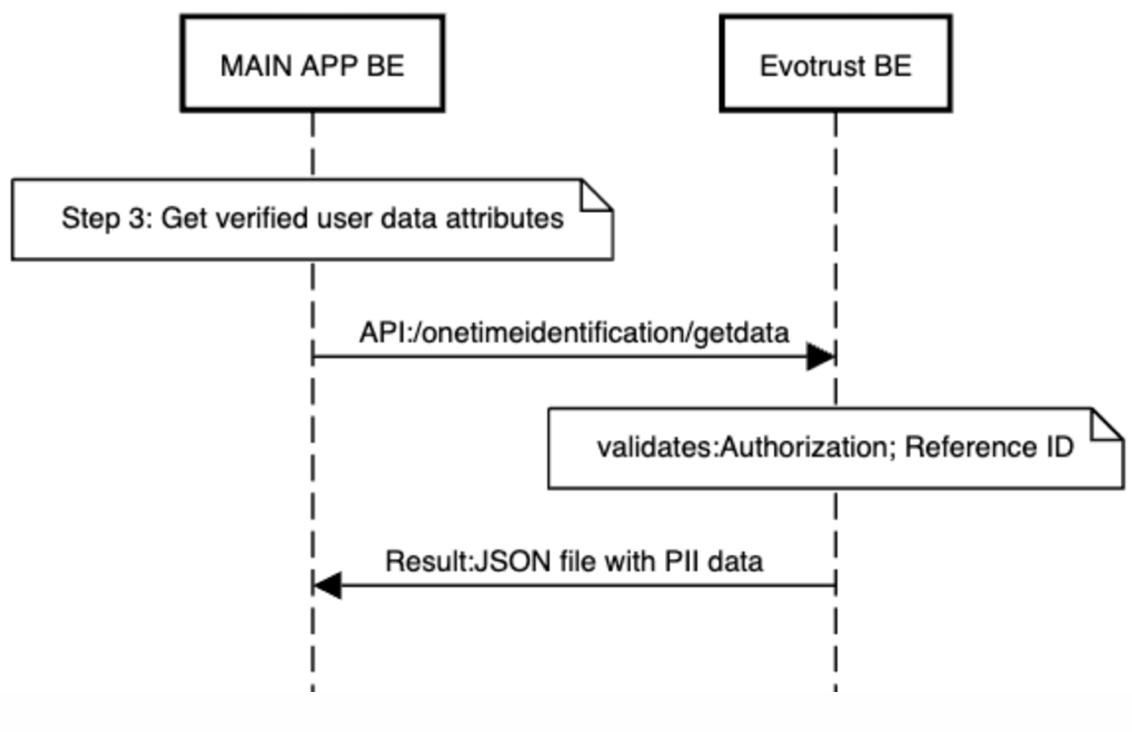
JSON file example, note that pictures are returned base64 encoded:
{
 "user": {
  "documentIssuerName": "MVR",
  "documentIssueDate": "16*******",
  "identificationNumber": "8********",
  "docType": "IDcard",
  "nationality": "България",
  "firstNameLatin": "IVAN",
  "lastNameLatin": "IVANOV",
  "documentValidDate": 1921190400,
  "userGender": "Female",
  "dateOfBirth": 460339210,
  "documentNumber": "64*******",
  "documentCountryCode": "BGR",
  "firstName": "И***",
  "lastName": "И******",
  "placeOfBirth": "Sofia",
  "middleName": "И*******",
  "middleNameLatin": "I********",
  "nationalityCountryCode": "BGR",
  "address": "Sofia, str.Sofia 1",
  "oneTimeIdentificationDate":”….”,
"userIDFront":"mgQ8kDrQGB6VWaQtxT4gRyTQBNSbgOM1G8uOBxTBljnOaAJ80EimFtozURYufSgCcNnvSmoowRQ8nYCgCTI9aXNVwCT3zUy5HWgB1FFFAxKKWigDZyeMVn3Q5Hbmr5zxwao3R3YYDHNAFc0UUUAFIaKCOOBmgCtIP3manzmqsnmPJnYRVi...",
"userIDBack":"bmnDigCGVeQadu4qQgHrTdo9KAGds1GB2qxikwPSgCJQwoQ4OKl49KTC9aAGyZK8UwplOKm4NJ9KAGRHAweKlBzTeM04cUAI4ytRR5XgjFTUhFAEcmWUAU0qQvSpQAKCc0ANjX5aeaAcUEigCGT74NNCndmpzjuKTgcUARuKcDxT6QAUANAyKavB...",
"userPicture": "wAgFhgcGBQgHBocJCIgJjBQNDAsLDBiRko6UHRmenhyZnBugJC4nICIropucKDaoq6+xM7Qznya4vLgyPC4ys7G/9sAQwEiJCQwKjBeNDRexoRwhMbGxsbGxsbGxsbGxsbGxsbGxsbGxsbGxsbGxsbGxsbGxsbGxsbGxsbGxsbGxsbGxsbG...",
"userSpecimen": "9sAQwAgFhgcGBQgHBocJCIgJjBQNDAsLDBiRko6UHRmenhyZnBugJC4nICIropucKDaoq6+xM7Qznya4vLgyPC4ys7G/9sAQwEiJCQwKjBeNDRexoRwhMbGxsbGxsbGxsbGxsbGxsbGxsbGxsbGxsbGxsbGxsbGxsbGxsbGxsbGxsbG..."
 },
 "sourceUserData": {
  "documentCountryCode": 6,
  "documentNumber": 6,
  "docType": 6,
  "documentValidDate": 6,
  "identificationNumber": 6,
  "firstName": 6,
  "middleName": 6,
  "lastName": 6,
  "firstNameLatin": 6,
  "middleNameLatin": 6,
  "lastNameLatin": 6,
  "dateOfBirth": 6,
  "nationality": 6,
  "nationalityCountryCode": 6,
  "userGender": 6,
  "placeOfBirth": 6,
  "documentIssuerName": 6,
  "documentIssueDate": 6,
  "address": 6,
  "userPicture": 6
 }
}
STEP 4 – eSign documents with OTP eSign
API requests are available here.
/document/doc/offline/refid
/document/group/offline/refid
Updated about 1 month ago