
e-Authentication
No more username & password. Confirm login to any application with a click of a button.
How It Works
Multi-Factor Authentication via Evrotrust app or with integrated mobile SDK within your own application.
Evrotrust's e-Authentication adds a secure second factor to any application login — leveraging the Evrotrust mobile app as a trusted authentication device. No hardware tokens or SMS codes required.
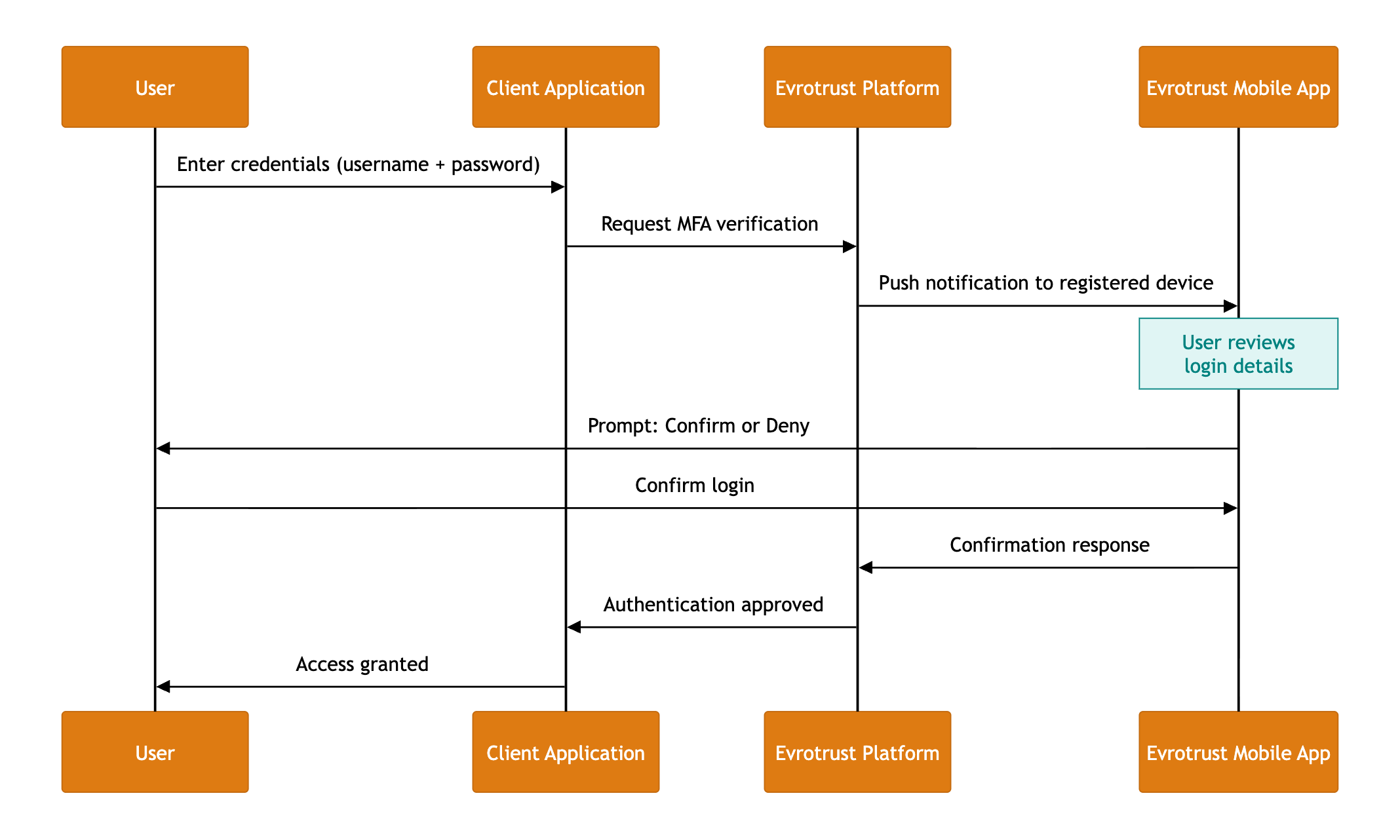
The 3-Step Flow
| Step | Action | Actor | Channel |
|---|---|---|---|
| User enters credentials into your application | User | Web / Desktop App |
| Evrotrust sends a push notification to the user's registered mobile device requesting login confirmation | Evrotrust Platform | Mobile Push |
| User logins to Evrotrust app, reviews the request and confirms their identity. Access is granted. | User | Evrotrust Mobile App |
ℹ️ Add extra security layer with our add-on service bioID, user will be requested to pass facial recognition step (biometric verification solution is used) to confirm the login.
Login confirmation can be signed with qualified certificate of the user, thus giving extra layer for audit purposes.
Key Security Properties
| Property | Description |
|---|---|
| Something you know | Unique identifier (person identification number or mobile phone number confirmed in the user profile, while creating reusable digital identity via Evrotrust app) |
| Something you have | The registered Evrotrust mobile app on the user's device |
| Something you are | Biometric and PIN verification within the Evrotrust app |
Why Evrotrust e-Authentication
- EU Certified (eIDAS) — backed by a Qualified Trust Service Provider ensuring the EU regulatory compliance
- No Hardware Tokens — the user's smartphone with the Evrotrust app replaces physical authenticators
- Push-Based Confirmation — no manual OTP code entry; a single tap confirms or denies the login
- Tamper-Resistant — binding between the user identity and the mobile device
- Seamless Integration — available via API, mobile SDK for rapid deployment
Updated 5 months ago
Did this page help you?