

Document Verification
Document verification enables fast, reliable, and accurate verification of identity documents. It automatically checks document visibility and extracts all personal data.
Documents are government issued, including passports and national ID cards. List of countries and supported ID dcouments: here .
User journey example
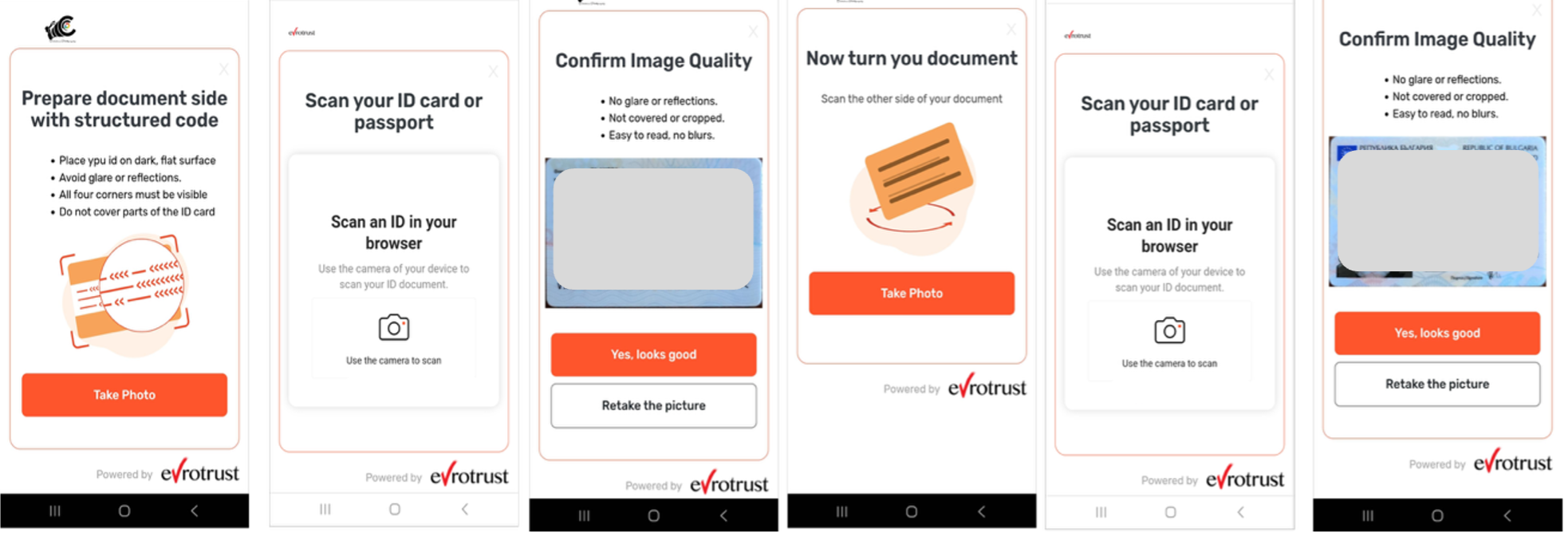
- User takes photo of the ID document in real time
- The system guides the user on whether to scan second side or not, depending on the document type template (country and year of issuance)
- Data is extracted automatically from the MRZ of the document via OCR.
Verification Controls
During document scanning, we do the following processing and validations:
| Verification Check | Description |
|---|---|
| Document capture and image quality assessment | Document capture capability to get an ideal image and automatically pre- process the document image. |
| Automatic document type identification | Automatically identifies the document type and country of origin and performs the necessary checks. Backed with the largest document template database. |
| Visual zone verification (OCR) | Processes the visual inspection zone (VIZ) of the ID document, which comprises the mandatory and optional data elements designed for visual inspection. |
| MRZ reading and verification | Processes and parse the data from the Machine-Readable Zone (MRZ). Support of ICAO 9303 (passports, visas, ID cards) standards. |
| Lexical analysis | Checks expiry date, validity, format, age, DOI, DOE, etc. |
| Data presence check in the mandatory fields on the data page | Automatically verifies if there is data in the required data fields. Detection of deprecated blanks. Automatically detects whether the document type is still valid or is already deprecated. |
| Verification of country codes | Checks country codes for existence and correctness. |
| Processing of graphic fields | Captures, crops, and displays graphic fields in the document (signature, portrait, etc.) as separate images. |
| Document number format check | Validates document number format and correctness in line with identity document type and issuing authority. |
| Personal number check | Reads and validates personal numbers—format, check digit, etc.—according to the rules specified by the issuing country. |
Updated 5 months ago
Did this page help you?